
Obsidian Enhancing-Export Compatibility Issue Record with Custom Attachment Path #
- Date: 2025-10-15
- Related Plugins:
- obsidian-enhancing-export (Export Enhancement)
- obsidian-custom-attachment-location (Custom Attachment Path)
- Operating System: Windows
Background and Phenomenon #
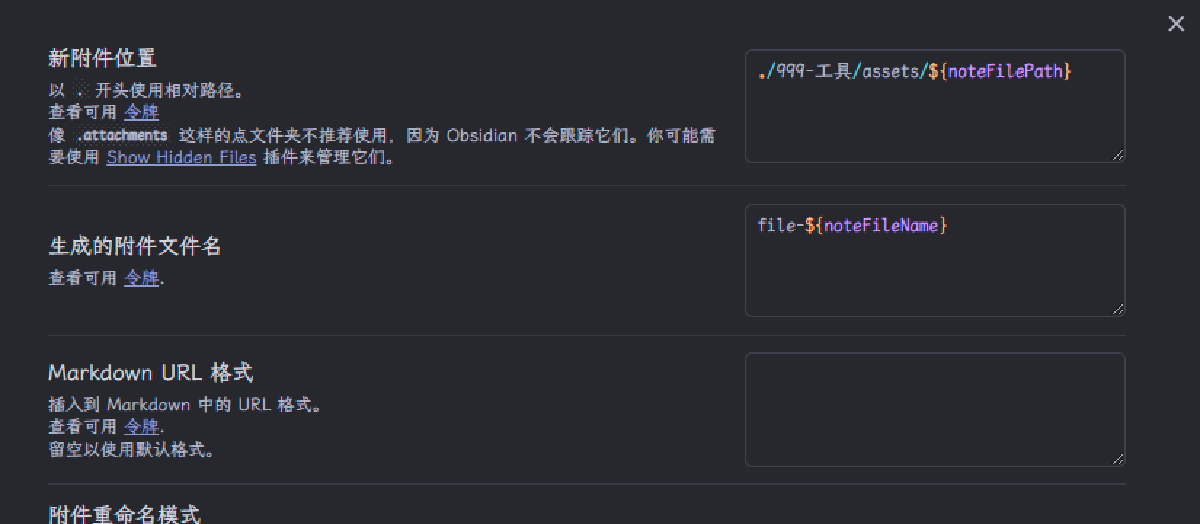
While using obsidian-custom-attachment-location to dynamically place attachments for each note according to a template (e.g., ./999-工具/assets/${noteFilePath}), and using obsidian-enhancing-export to export (such as Markdown/HTML/PDF), it was found that the exported image and other resource paths sometimes cannot be resolved, and only temporarily take effect after “resetting” the core attachment directory once in Obsidian settings.

Reproduction Steps (Summary) #
- Enable two plugins in the vault:
- Custom attachment path plugin uses a per-note path template (e.g.,
./999-工具/assets/${noteFilePath}). - Export enhancement plugin uses built-in Pandoc templates (which include
--resource-path="${currentDir}"and--resource-path="${attachmentFolderPath}").
- Custom attachment path plugin uses a per-note path template (e.g.,
- Insert a local image in a note (the image is actually saved to the custom attachment directory).
- Use export enhancement to export, images in the export result cannot be resolved (resource not found).
Root Cause Analysis #
- The custom attachment path plugin overrides the getter of
app.vault.getConfig('attachmentFolderPath'), dynamically returning the “note-related” attachment directory when “reading configuration”. - The export enhancement plugin, when constructing the export context, reads the “static configuration snapshot”
app.vault.config.attachmentFolderPath, without calling the getter. Therefore, during export, it gets a fixed value, inconsistent with each note’s dynamic directory, causing--resource-pathto point incorrectly.
In other words: Should use app.vault.getConfig('attachmentFolderPath') (dynamic) instead of app.vault.config.attachmentFolderPath (static).
Solutions #
This time choose “Solution B (no code change)”, while recording “Solution A (minimal code change)” as backup.
Solution A: Minimal Change (Change 1 Line, Long-term Correct) #
Change the attachment directory acquisition method in the export enhancement plugin when constructing the export context to call the getter:
- Original:
let D = Y.attachmentFolderPath ?? "/";
- Suggested change:
let D = (e.app.vault.getConfig && e.app.vault.getConfig("attachmentFolderPath")) ?? Y.attachmentFolderPath ?? "/";
This allows the export enhancement to always read the “per-note dynamic directory” provided by the custom attachment plugin. This is the cleanest approach, but requires modifying the packaged main.js of the plugin, which may be overwritten by future upgrades.
Complaint: The main.js of this project is almost unreadable
Later, to adapt to leaf pages, the scheme of modifying the plugin was adopted
Solution B: No Code Change (Add One resource-path in Template) #
Utilize the template expression support of export enhancement, add a new --resource-path in Arguments, directly splicing out the custom attachment directory based on the current note path. Example (corresponding to template ./999-工具/assets/${noteFilePath}):
In the “Command Template → Arguments” of export enhancement, in addition to the existing
--resource-path="${currentDir}"
--resource-path="${attachmentFolderPath}"
Add another one (replace the prefix 999-工具/assets with your own rule):
--resource-path="${vaultDir}/999-工具/assets/${(currentPath.substring(vaultDir.length+1).replace(/\.[^/.]+$/,''))}"
 Explanation:
vaultDir: Vault root directory (absolute path, export enhancement automatically normalizes to forward slashes on Windows).currentPath: Current note absolute path (export enhancement also normalizes to forward slashes on Windows).currentPath.substring(vaultDir.length+1): Get “vault-relative path (with extension)”.replace(/\.[^/.]+$/,''): Remove extension, equivalent to${noteFilePath}.- Multiple
--resource-path: Pandoc searches sequentially, the added one does not affect existing logic. - The combined path is equivalent to the directory generated by the custom attachment plugin template.
Advantages:
- No need to modify plugin files, unaffected by plugin upgrades.
- Can be added or adjusted separately for different export types as needed.
Note:
- If the directory template of the custom attachment plugin is changed in the future (such as prefix or rules), remember to update this
--resource-pathsynchronously. - If the attachment directory contains spaces, it is already wrapped in quotes, Pandoc can recognize correctly.